
Here is the end result:
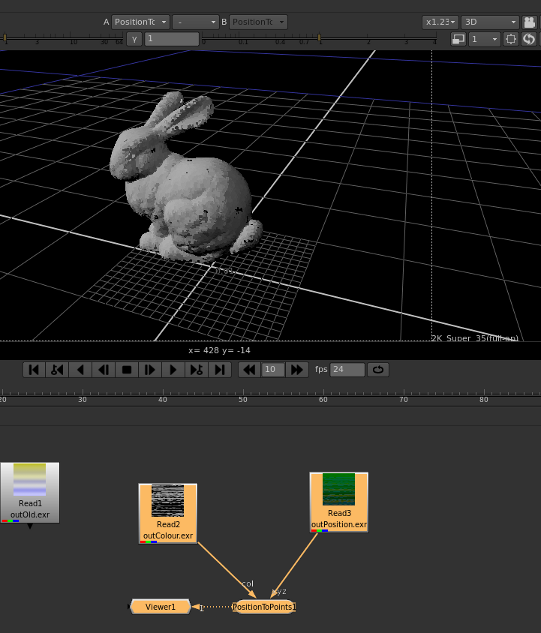
First things first I need a model to work with
Model
Shader
surface bakeColourAndPosition(
uniform float diffuseAmount = 1;
varying color surfaceColour = color(0.18,0.18,0.18);
varying color opacityColour = color(0.99,0.99,0.99);
uniform string bakeFile="/tmp/out.bake";
)
{
   varying normal Nn = normalize(N);
   Ci = diffuse(Nn)*surfaceColour*diffuseAmount*Cs;
   Oi = opacityColour*Os;
   varying point Pworld = transform("current","world",P);
   bake(concat(bakeFile,"Position"),s,t,Pworld);
   bake(concat(bakeFile,"Colour"),s,t,Ci);
   Ci *= Oi;
}
This shader will produce two text "bakefile" files in the /tmp directory
Note: The texture coordinates are ignored, only using the 3rd,4th and 5th values
- one named out.bakeColour with colour information
- one named out.bakePosition with position information
Output Bakefiles
- Download .tar.gz here...
Due to the SIMD nature of shaders the line count of each of the bake files is the same so they should contain line for line the same information about the Position and Colour Respectively.
They are in ASCII format so they are easy enough to parse with Python.
here is an example of thier content:
out.bakePositionmh
3
0 1 -0.07415867 0.17987273 -0.05079475
0 1 -0.073529155 0.1800126 -0.051191031
0 1 -0.07289961 0.18015243 -0.051587344
0 1 -0.072270096 0.18029229 -0.051983685
0 1 -0.07164058 0.18043211 -0.052379965
0 1 -0.07101102 0.18057197 -0.052776248
0 1 -0.07038155 0.1807118 -0.053172619
Creating Position and Colour EXR files using cortex-vfx
#!/usr/bin/env python

import sys,os,math

IECoreInstallPath = "/usr/lib/python2.6/site-packages"

if IECoreInstallPath not in sys.path:
	sys.path.append(IECoreInstallPath)

from IECore import *

bakeFolder = "/tmp"

colorBakeFileLocation = os.path.sep.join([bakeFolder,"out.bakeColour"])

positionBakeFileLocation = os.path.sep.join([bakeFolder,"out.bakePosition"])


def parseBakeFile(bakeFileLocation):
	data = []
	counter = 0
	bakeFile = open(bakeFileLocation,"r")
	for line in bakeFile.readlines():
		counter +=1
		if counter > 2:
			stuff = line.strip().split(" ")
			if len(stuff) > 2:
				data.append((float(stuff[2]),float(stuff[3]),float(stuff[4])))
	print "Completed parsing %d lines of file %s" % (len(data),bakeFileLocation)
	bakeFile.close()
	return data

colourData = parseBakeFile(colorBakeFileLocation)

positionData = parseBakeFile(positionBakeFileLocation)

if len(colourData) == len(positionData):
	squareSize = int(math.sqrt(len(positionData))) +1
	print "Square Size: %d, Excess Pixels : %d" % (squareSize,squareSize*squareSize - len(colourData))
	width = squareSize
	height = squareSize
	x = FloatVectorData( width * height )
	y = FloatVectorData( width * height )
	z = FloatVectorData( width * height )

	r = FloatVectorData( width * height )
	g = FloatVectorData( width * height )
	b = FloatVectorData( width * height )

	for i in range(len(colourData)):
		r[i]=colourData[i][0]
		g[i]=colourData[i][1]
		b[i]=colourData[i][2]
		x[i]=positionData[i][0]
		y[i]=positionData[i][1]
		z[i]=positionData[i][2]

	boxColour = Box2i( V2i( 0, 0 ), V2i( width-1, height-1 ) )
	boxPosition = Box2i( V2i( 0, 0 ), V2i( width-1, height-1 ) )

	imageColour = ImagePrimitive( boxColour, boxColour )
	imagePosition = ImagePrimitive( boxPosition, boxPosition )

	imagePosition["R"]= PrimitiveVariable( PrimitiveVariable.Interpolation.Vertex, x)
	imagePosition["G"]= PrimitiveVariable( PrimitiveVariable.Interpolation.Vertex, y)
	imagePosition["B"]= PrimitiveVariable( PrimitiveVariable.Interpolation.Vertex, z)

	imageColour["R"]= PrimitiveVariable( PrimitiveVariable.Interpolation.Vertex, r)
	imageColour["G"]= PrimitiveVariable( PrimitiveVariable.Interpolation.Vertex, g)
	imageColour["B"]= PrimitiveVariable( PrimitiveVariable.Interpolation.Vertex, b)

	writePosition = Writer.create( imagePosition, "/tmp/outPosition.exr" )
	writeColour = Writer.create( imageColour, "/tmp/outColour.exr" )
	writePosition.write()
	writeColour.write()
See more about cortex-vfx on google code:
Using Nuke to read the Position and Colour Data
![File > Script Command [X] > PositionToPoints](/sam/sites/default/files/blog/positiontopoints-300x163.png "positiontopoints")
File > Script Command > PositionToPoints If you werent able to create your own pair of EXRs you can download the pair here in .tar.bz2 format
So then you just need to connect them up to the input nodes for the PositionToPoints 3d node as follows:
Nuke Node "PositionToPoints" with 3d EXR inputs If you thought this was useful leave a comment, or if you thought it was stupid leave a comment about how to improve it
Sam
![File > Script Command [X] > PositionToPoints](/sam/sites/default/files/blog/positiontopoints.png "positiontopoints")
- Log in to post comments
Comments
[...] and tonnes of Nuke information from Nukepedia. Sam Hodge
Pingback:
[...] and tonnes of Nuke information from Nukepedia. Sam Hodge has a tutorial about creating point clouds in Nuke using 3delight and Cortex. And Cloud Compare lets you compare very large point clouds. MRV is a [...]- Log in to post comments
Hi Sam I use Renderman Studio 3 with Maya 2010 (PRMan). Is yo
- Log in to post comments
Sorry I dont own Renderman Studio, so I cant help you out, you c
- Log in to post comments