
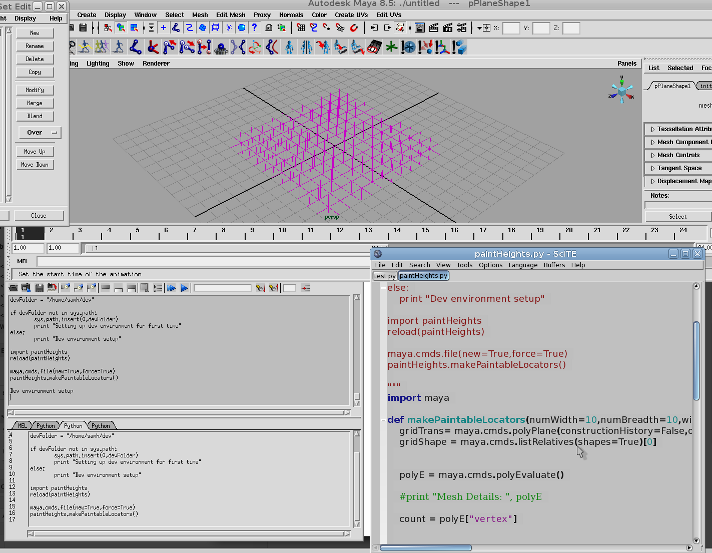
I think I may have just found my answer that the control points are not points but face points
Like the difference between samples and points in Softimage.
I have never like the term texture verts or face normals, the term samples is a lot easier to swallow and less likely to confuse
But in the event I give up and ask for help on a forum but I will publish my foolish attempt below
- Created a grid
- Covered with locators
- Added a RGB map
- Linked the height of the locators to the RGB map R value
- Curse at the cruelty of the world
"""

import os,sys,maya

devFolder = "/home/samh/dev"

if devFolder not in sys.path:
	sys.path.insert(0,devFolder)
	print "Setting up dev environment for first time"
else:
	print "Dev environment setup"

import paintHeights
reload(paintHeights)

maya.cmds.file(new=True,force=True)
paintHeights.makePaintableLocators()

"""
import maya

def makePaintableLocators(numWidth=10,numBreadth=10,width=10,height=0.5,breadth=10):
	gridTrans= maya.cmds.polyPlane(constructionHistory=False,o=True,width=width,height=breadth,sw=numWidth,sh=numBreadth,cuv=2)
	gridShape = maya.cmds.listRelatives(shapes=True)[0]


	polyE = maya.cmds.polyEvaluate()

	#print "Mesh Details: ", polyE

	count = polyE["vertex"]


	#print "Hoopla",count
	#print maya.cmds.getAttr("%s.controlPoints" % gridShape)


	positions = [maya.cmds.getAttr("%s.vt[%d]" % (gridShape,i) )[0] for i in range(count)]
	#print "Positions: " , positions
	locators = ["%s" % maya.cmds.spaceLocator(position=(0,0,0))[0] for i in range(count)]

	[maya.cmds.setAttr("%s.translateX" % locators[i],positions[i][0]) for i in range(count)]
	[maya.cmds.setAttr("%s.translateY" % locators[i],positions[i][1]) for i in range(count)]
	[maya.cmds.setAttr("%s.translateZ" % locators[i],positions[i][2]) for i in range(count)]
	[maya.cmds.setAttr("%s.template"%i,True) for i in locators]
	maya.cmds.select(gridShape)
	colourSet = maya.cmds.polyColorSet(create=True,colorSet="heightField",newColorSet="heightField")[0]
	heights = [maya.cmds.getAttr("%s.colorSet[0].colorSetPoints[%s]" % (gridShape,i)) for i in range(count)]
	#print "Initial Heights: ", heights

	maya.cmds.polyColorPerVertex(rgb=(0.5,0.5,0.5),cdo=True)
	heightsNew = [maya.cmds.getAttr("%s.colorSet[0].colorSetPoints[%s]" % (gridShape,i)) for i in range(count)]


	#print "Heights New: ", heightsNew
	expressions = ["%s.translateY=(%s.colorSet[0].colorSetPoints[%s].colorSetPointsR - 0.5) * %f" % (locators[i], gridShape,i,height) for i in range(count)]
	#expressions = ["%s.translateY=(%s.colorPerVertex.vertexColor[%s].vertexColorRGB.vertexColorR) * %f" % (locators[i], gridShape,i,height) for i in range(count)]

	#values =[maya.cmds.getAttr("%s.colorPerVertex.vertexColor[%s].vertexColorRGB.vertexColorR" % (gridShape,i)) for i in range(count)]


	#print values

	[maya.cmds.expression(string = i) for i in expressions]

	return
This must be a bug, here are the repro steps
"""

import os,sys,maya

devFolder = "/home/samh/dev"

if devFolder not in sys.path:
	sys.path.insert(0,devFolder)
	print "Setting up dev environment for first time"
else:
	print "Dev environment setup"

import paintHeights
reload(paintHeights)

maya.cmds.file(new=True,force=True)
paintHeights.makePaintableLocators()

"""
import maya

def makePaintableLocators(numWidth=10,numBreadth=10,width=10,height=10,breadth=10):
	gridTrans= maya.cmds.polyPlane(constructionHistory=False,o=2	,width=width,height=breadth,sw=numWidth,sh=numBreadth,cuv=2)
	gridShape = maya.cmds.listRelatives(shapes=True)[0]
	polyE = maya.cmds.polyEvaluate()
	count = polyE["vertex"]
	positions = [maya.cmds.getAttr("%s.vt[%d]" % (gridShape,i) )[0] for i in range(count)]
	locators = ["%s" % maya.cmds.spaceLocator(position=(0,0,0))[0] for i in range(count)]
	[maya.cmds.setAttr("%s.translateX" % locators[i],positions[i][0]) for i in range(count)]
	[maya.cmds.setAttr("%s.translateY" % locators[i],positions[i][1]) for i in range(count)]
	[maya.cmds.setAttr("%s.translateZ" % locators[i],positions[i][2]) for i in range(count)]
	[maya.cmds.setAttr("%s.template" % locators[i],1) for i in range(count)]
	maya.cmds.select(gridShape)
	colourSet = maya.cmds.polyColorSet(create=True,colorSet="heightField",newColorSet="heightField")[0]
	heights = [maya.cmds.getAttr("%s.colorSet[0].colorSetPoints[%s]" % (gridShape,i)) for i in range(count)]
	maya.cmds.polyColorPerVertex(rgb=(0.5,0.5,0.5),cdo=True)
	heightsNew = [maya.cmds.getAttr("%s.colorSet[0].colorSetPoints[%s]" % (gridShape,i)) for i in range(count)]
	a = [maya.cmds.setAttr("%s.colorSet[0].colorSetPoints[%s].colorSetPointsR" % (gridShape,i),0.5) for i in range(count*40)]
	expressions = ["%s.translateY=(%s.colorSet[0].colorSetPoints[%s].colorSetPointsR - 0.5) * %f" % (locators[i], gridShape,i,height) for i in range(count)]
	[maya.cmds.expression(string = i) for i in expressions]
	return
- Log in to post comments
Comments
I realize this is out of date now but I managed to have some luc
I realize this is out of date now but I managed to have some luck when using expressions to take the RGB from the texture UV. The Python command has a flag to update frame for frame: cmds.expression( o=i, ae=True, s="...")
here's an example of the expression that you might end up with:
$foundUV = `polyListComponentConversion -fv -tuv FollowMesh_T.vtx[0]`;
$uv = `polyEditUV -q $foundUV`;
$RGBColor = `colorAtPoint -o RGB -u $uv[0] -v $uv[1] FollowMesh_Texture`;
FollowMesh_T_Locator_0_000.tx = $RGBColor[0]
Thanks for the head start, keep up the good work! :)
- Log in to post comments