
Basically this post is a call for help, and once I have it solved it will become a reference for anybody else trying to do the same thing in the future.
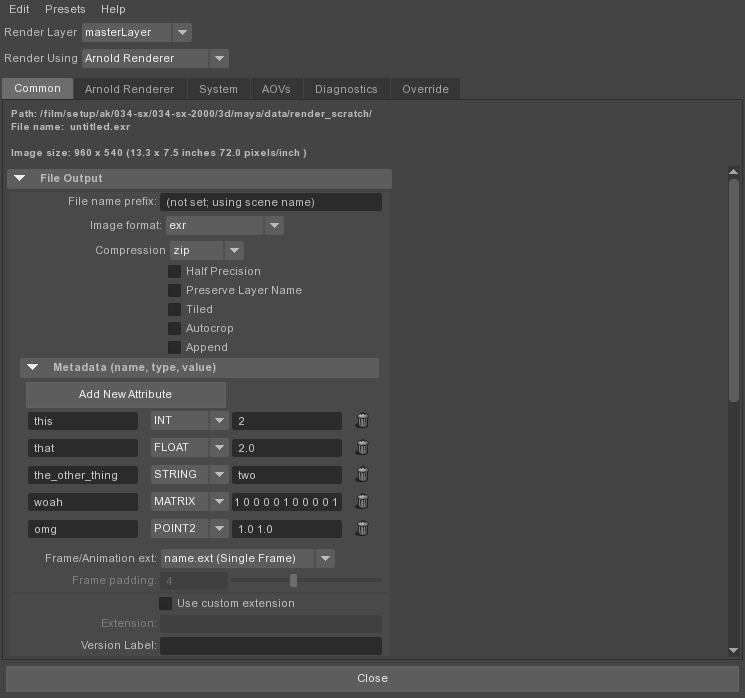
In the Maya Arnold Render Globals there are some fields to Add MetaData with a "Name", "Type" and "Value" field available.
Which is cool if you are clicking, but if you want to push these buttons with code, what are the attributes called or the methods are to set them
so basically the answer is usually documented in the source
class EXRDriverTranslatorUI(templates.AttributeTemplate):
    def changeAttrName(self, nodeName, attrNameText, index):
        # Get the attribute name, type and value
        attrName = nodeName+'['+str(index)+']'
        metadata = cmds.getAttr(attrName)
        result = metadata.split(' ', 2 )
        result += [""] * (3-len(result))

        # Get the new name
        name = cmds.textField(attrNameText, query=True, text=True)

        # Update the name in all the templates
        templatesNames[:] = [tup for tup in templatesNames if cmds.columnLayout(tup, exists=True)]
        for templateName in templatesNames:
            cmds.textField(templateName+"|mtoa_exrMetadataRow_"+str(index)+"|MtoA_exrMAttributeName", edit=True, text=name.replace(" ", ""))

        # Update the metadata value
        metadata = result[0]+" "+name.replace(" ", "")+" "+result[2]
        cmds.setAttr(attrName, metadata, type="string")

    def changeAttrType(self, nodeName, menu, index):
        # Get the attribute name, type and value
        attrName = nodeName+'['+str(index)+']'
        metadata = cmds.getAttr(attrName)
        result = metadata.split(' ', 2 )
        result += [""] * (3-len(result))

        # Get the new type
        typeNumber = cmds.optionMenu(menu, query=True, select=True)
        type = cmds.optionMenu(menu, query=True, value=True)

        # Update the type in all the templates
        templatesNames[:] = [tup for tup in templatesNames if cmds.columnLayout(tup, exists=True)]
        for templateName in templatesNames:
            cmds.optionMenu(templateName+"|mtoa_exrMetadataRow_"+str(index)+"|MtoA_exrMAttributeType", edit=True, select=typeNumber)

        # Update the metadata value
        metadata = type+" "+result[1]+" "+result[2]
        cmds.setAttr(attrName, metadata, type="string")

    def changeAttrValue(self, nodeName, attrValueText, index):
        # Get the attribute name, type and value
        attrName = nodeName+'['+str(index)+']'
        metadata = cmds.getAttr(attrName)
        result = metadata.split(' ', 2 )
        result += [""] * (3-len(result))

        # Get the new value
        value = cmds.textField(attrValueText, query=True, text=True)

        # Update the value in all the templates
        templatesNames[:] = [tup for tup in templatesNames if cmds.columnLayout(tup, exists=True)]
        for templateName in templatesNames:
            cmds.textField(templateName+"|mtoa_exrMetadataRow_"+str(index)+"|MtoA_exrMAttributeValue", edit=True, text=value)

        # Update the metadata value
        metadata = result[0]+" "+result[1]+" "+value
        cmds.setAttr(attrName, metadata, type="string")

    def removeAttribute(self, nodeName, index):
        cmds.removeMultiInstance(nodeName+'['+str(index)+']')
        self.updatedMetadata(nodeName)

    def addAttribute(self, nodeName):
        next = 0
        if cmds.getAttr(nodeName, multiIndices=True):
            next = cmds.getAttr(nodeName, multiIndices=True)[-1] + 1
        cmds.setAttr(nodeName+'['+str(next)+']', "INT", type="string")
        self.updatedMetadata(nodeName)

    def updateLine(self, nodeName, metadata, index):
        # Attribute controls will be created with the current metadata content
        result = metadata.split(' ', 2 )
        result += [""] * (3-len(result))

        # Attribute Name
        attrNameText = cmds.textField("MtoA_exrMAttributeName", text=result[1])
        cmds.textField(attrNameText, edit=True, changeCommand=pm.Callback(self.changeAttrName, nodeName, attrNameText, index))

        # Attribute Type
        menu = cmds.optionMenu("MtoA_exrMAttributeType")
        cmds.menuItem( label='INT', data=0)
        cmds.menuItem( label='FLOAT', data=1)
        cmds.menuItem( label='POINT2', data=2)
        cmds.menuItem( label='MATRIX', data=3)
        cmds.menuItem( label='STRING', data=4)
        if result[0] == 'INT':
            cmds.optionMenu(menu, edit=True, select=1)
        elif result[0] == 'FLOAT':
            cmds.optionMenu(menu, edit=True, select=2)
        elif result[0] == 'POINT2':
            cmds.optionMenu(menu, edit=True, select=3)
        elif result[0] == 'MATRIX':
            cmds.optionMenu(menu, edit=True, select=4)
        elif result[0] == 'STRING':
            cmds.optionMenu(menu, edit=True, select=5)
        cmds.optionMenu(menu, edit=True, changeCommand=pm.Callback(self.changeAttrType, nodeName, menu, index))

        # Attribute Value
        attrValueText = cmds.textField("MtoA_exrMAttributeValue", text=result[2])
        cmds.textField(attrValueText, edit=True, changeCommand=pm.Callback(self.changeAttrValue, nodeName, attrValueText, index))

        # Remove button
        cmds.symbolButton(image="SP_TrashIcon.png", command=pm.Callback(self.removeAttribute, nodeName, index))

    def updatedMetadata(self, nodeName):
        templatesNames[:] = [tup for tup in templatesNames if cmds.columnLayout(tup, exists=True)]
        for templateName in templatesNames:
            cmds.setParent(templateName)
            #Remove all attributes controls and rebuild them again with the metadata updated content
            for child in cmds.columnLayout(templateName, query=True, childArray=True) or []:
                cmds.deleteUI(child)
            for index in cmds.getAttr(nodeName, multiIndices=True) or []:
                attrName = nodeName+'['+str(index)+']'
                metadata = cmds.getAttr(attrName)
                if metadata:
                    cmds.rowLayout('mtoa_exrMetadataRow_'+str(index),nc=4, cw4=(120,80,120,20), cl4=('center', 'center', 'center', 'right'))
                    self.updateLine(nodeName, metadata, index)
                    cmds.setParent('..')

    def metadataNew(self, nodeName):
        cmds.rowLayout(nc=2, cw2=(200,140), cl2=('center', 'center'))
        cmds.button( label='Add New Attribute', command=pm.Callback(self.addAttribute, 'defaultArnoldDriver.custom_attributes'))
        cmds.setParent( '..' )
        layout = cmds.columnLayout(rowSpacing=5, columnWidth=340)
        # This template could be created more than once in different panels
        templatesNames.append(layout)
        self.updatedMetadata('defaultArnoldDriver.custom_attributes')
        cmds.setParent( '..' )

    def metadataReplace(self, nodeName):
        pass

    def setup(self):
        self.addControl('exrCompression', label='Compression')
        self.addControl('halfPrecision', label='Half Precision')
        self.addControl('preserveLayerName', label='Preserve Layer Name')
        self.addControl('tiled', label='Tiled')
        self.addControl('autocrop', label='Autocrop')
        self.addControl('append', label='Append')
        self.beginLayout("Metadata (name, type, value)", collapse=True)
        self.addCustom('custom_attributes', self.metadataNew, self.metadataReplace)
        self.endLayout()
So after that it isn't rocket surgery
There is a compound attribute with strings in it called "custom attributes" as seen in the screen shot below
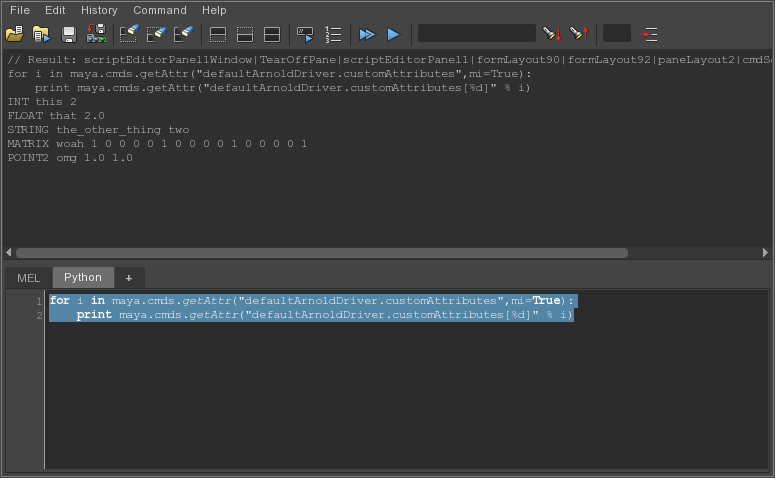
So if you want to bang another another value into that custom attribute you can
#Print attributes
for i in maya.cmds.getAttr("defaultArnoldDriver.customAttributes",mi=True):
    print maya.cmds.getAttr("defaultArnoldDriver.customAttributes[%d]" % i)


def addAttribute(nodeName, value):
    """
    \add an attribute
    """
    next = 0
    if cmds.getAttr(nodeName, multiIndices=True):
        next = cmds.getAttr(nodeName, multiIndices=True)[-1] + 1
    cmds.setAttr(nodeName+'['+str(next)+']', "%s %s %s" % (value["type"],value["name"],value["value"]), type="string")

#Call function above
example = {"type":"FLOAT","name":"example","value":2.0}
nodeName = "defaultArnoldDriver.customAttributes"
addAttribute(nodeName,example)

#Print attributes again after adding
for i in maya.cmds.getAttr("defaultArnoldDriver.customAttributes",mi=True):
    print maya.cmds.getAttr("defaultArnoldDriver.customAttributes[%d]" % i)

#This updates the GUI
from mtoa.ui.ae import customShapeAttributes

c = customShapeAttributes.EXRDriverTranslatorUI('aiAOVDriver')

c.updatedMetadata(nodeName)
But that doesn't update the GUI, but may make an EXR with meta data.
So I think I need to do it with a little more care.
But in reality it is there in the data structure, the gui will be updated if you just add and then delete an element, because it will call updatedMetadata method in the class above.
So I guess I could just call that by myself.
If I knew how to get to the method of a callback on an AE template installed by a Python Class.
Basically that is the start of the reverse engineering.
Will update once it is properly solved.
Also it doesn't enable me to set these values with an expression per frame, but that shouldn't be too tricky to do.
- Log in to post comments
Comments
Hey Sam. I do have a solution how the GUI is updated correcte
- Log in to post comments
Hello Sam, That's an interesting post, thanks for sharing! Di
- Log in to post comments
Hi thanks for this .. this saved me a bit of work figuring our
- Log in to post comments